Installing Capture Tools
Browser Extension
Section titled “Browser Extension”nQuest has a browser extension that allows you to perform captures on any website. For more details on using the Browser Extension, see Capture Nodes. Currently, Chrome, Firefox, and Edge are supported.
Google Chrome
Section titled “Google Chrome”To download the extension, go to the Chrome Web Store while using Chrome and click “Add to Chrome”.
For more assistance, see the install and manage extensions on the Google Chrome Help Center.
Mozilla Firefox
Section titled “Mozilla Firefox”To download the extension, go to the Firefox Add-ons page while using Firefox and click “Add to Firefox”.
For more assistance, see the Find and install add-ons on the Mozilla Firefox Knowledge Base.
Microsoft Edge
Section titled “Microsoft Edge”To download the extension, go to the Microsoft Edge Add-ons page while using Microsoft Edge and click “Get”.
For more assistance, see the Add, turn off, or remove extensions at Microsoft Edge Support.
Discord (Shelter) Plugin
Section titled “Discord (Shelter) Plugin”nQuest has a plugin for Shelter, an unauthorized third-party Discord client. This plugin allows you to capture messages from Discord channels.
Windows
Section titled “Windows”- First, install the Discord App. If the Discord App is already installed, you can skip this step. Shelter is an in-place modification of the official Discord client.
- Next, download the Shelter Installer. (use the .exe file for Windows)
Shelter Install
-
Open the downloaded file, select Stable, and click Install. You should see a popup that confirms shelter has been installed correctly.
-
Restart Discord to complete Shelter installation. From this point forwards, the install is the same as on MacOS.
Shelter Install Plugin
Next, open the Discord Client and go to the Shelter: Settings menu on the left.
Click on Add Plugin and copy paste the following URL into the URL field:
https://nquest-capture-utils.b-cdn.net/discord-shelter-extClick Fetch, and the capture tools should now be installed in Discord. Turn them on and you’re all set!
- First, install the Discord App. If the Discord App is already installed, you can skip this step. Shelter is an in-place modification of the official Discord client.
- Next, download the Shelter Installer. (use the .dmg file for MacOS)
- Open the downloaded file and double click on ‘Install Shelter’. You’ll get an error message (this is important for the next step). Click cancel.
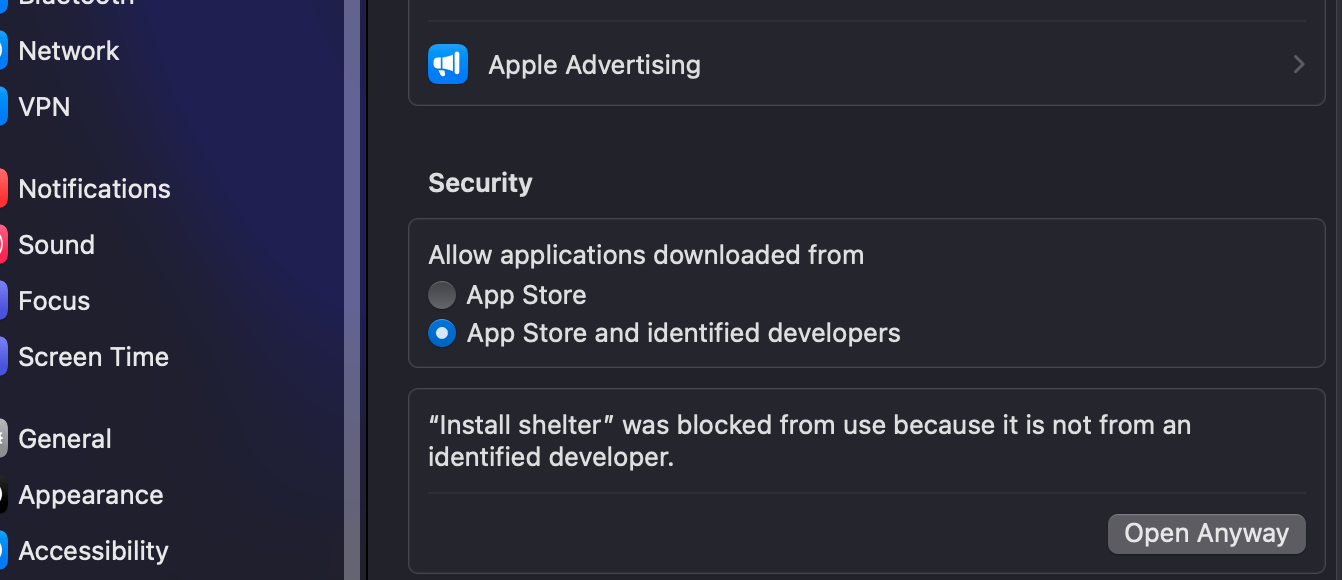
Shelter Privacy Settings
- Open Mac Privacy & Security settings and click on Open Anyway next to the message about Shelter. This will require your password.
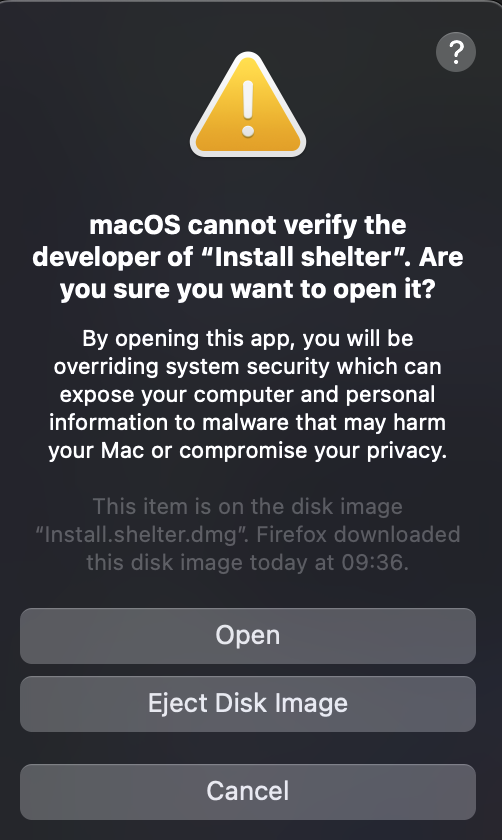
- There will now be another warning message that displays. Click on Open to continue.
Shelter Install
-
Select Stable and click Install. You should see a popup that confirms shelter has been installed correctly.
-
Restart Discord to complete Shelter installation. From this point forwards, the install is the same as on Windows.
Shelter Install Plugin
Next, open the Discord Client and go to the Shelter: Settings menu on the left.
Click on Add Plugin and copy paste the following URL into the URL field:
https://nquest-capture-utils.b-cdn.net/discord-shelter-extClick Fetch, and the capture tools should now be installed in Discord. Turn them on and you’re all set!